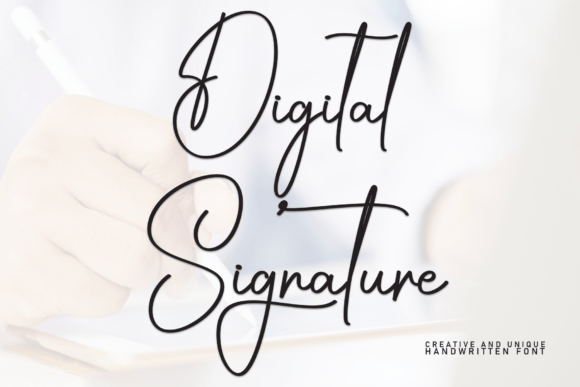
Digital Signature Font Review
As a web designer, I’m always on the lookout for fonts that bring personality to a site without sacrificing readability. Digital Signature has quickly become one of my go-to choices for headers and decorative elements. It’s a script font with a soft, handwritten feel that still feels professional and easy to read.
A Perfect Fit for Web Headers
I first tested Digital Signature on a boutique online store’s hero section. The font added a warm, personal touch to the main headline, making the brand feel more approachable. It worked especially well when paired with a clean sans serif font for the subtext. The contrast made the design feel balanced and modern.
The font’s curves and flourishes give it a subtle elegance, which is perfect for landing pages that need a bit of flair. I used it on a call-to-action button for a course sales page, and it stood out without being overwhelming. The key was keeping the text short—Digital Signature isn’t meant for long paragraphs.
Responsive Design and Mobile Readability
On mobile devices, Digital Signature holds up surprisingly well. I tested it on a portfolio site where the font was used in the navigation menu. At smaller sizes, it remained legible, though I noticed some of the finer details got lost. That’s why I recommend using it for larger headings or decorative accents rather than body text.
When placing the font over image banners, I found that it worked best on light backgrounds. On dark backgrounds, the font needed a slight adjustment in weight to maintain clarity. It’s also important to consider how the font looks against different color schemes. A high-contrast combination can make the font pop, while a low-contrast setup might require a bolder version.
Brand Identity and Visual Hierarchy
Digital Signature adds a unique visual identity to a website. I used it in a coaching site’s logo, and it gave the brand a friendly, authentic vibe. It’s ideal for businesses that want to communicate creativity and warmth without being too formal.
In terms of visual hierarchy, the font works best as a display font. It draws attention but doesn’t compete with other design elements. I paired it with a simple serif font for the body copy, which created a cohesive look while maintaining readability.
One thing to keep in mind is that Digital Signature may not be the best choice for accessibility-heavy interfaces. If a site relies heavily on small text or form labels, a more traditional font would be better suited for those areas. But for headers, buttons, and promotional sections, it shines.
Font Pairing and Web Performance
When pairing Digital Signature with other fonts, I found that it pairs well with both sans serif and serif typefaces. A clean, modern sans serif like Open Sans or Lato complements the script font nicely, creating a polished and professional look. For a more editorial feel, a classic serif like Georgia or Playfair Display can add depth and sophistication.
From a technical standpoint, the font is available in web-friendly formats, which makes it easy to integrate into any site. I checked the file sizes and found them to be reasonable, so they shouldn’t slow down page load times. The font also includes multiple weights and alternates, which gives designers more flexibility when building custom layouts.
For commercial use, the licensing is clear and straightforward. As a web designer, I appreciate that the font allows for use on client projects and digital products. It’s important to verify the license terms before using it in a live environment, especially if the site will be hosted on a platform with specific font restrictions.
Real-World Applications
I’ve used Digital Signature in a variety of web projects, from product landing pages to blog headers. In one instance, it was used for a creative portfolio site, where it helped set the tone for the entire brand. The font felt right at home in a space that valued artistry and individuality.
Another project involved a digital brand kit for a small business. The font was used in the logo, social media graphics, and email templates. It provided a consistent look across all platforms, reinforcing the brand’s identity. The font’s versatility made it a valuable asset in the design process.
Overall, Digital Signature is a great choice for web designers looking to add a personal, handwritten touch to their sites. It’s not a font for every situation, but when used correctly, it can elevate a design and make a brand stand out.